Creating a test for remote testing
Remote tests run in a web browser, or in the Eye Precision Tests app. You create them in Eye Precision
Open Create Remote Test
On the start screen, click Create Remote Test… (under Remote testing). It is also in the Go menu
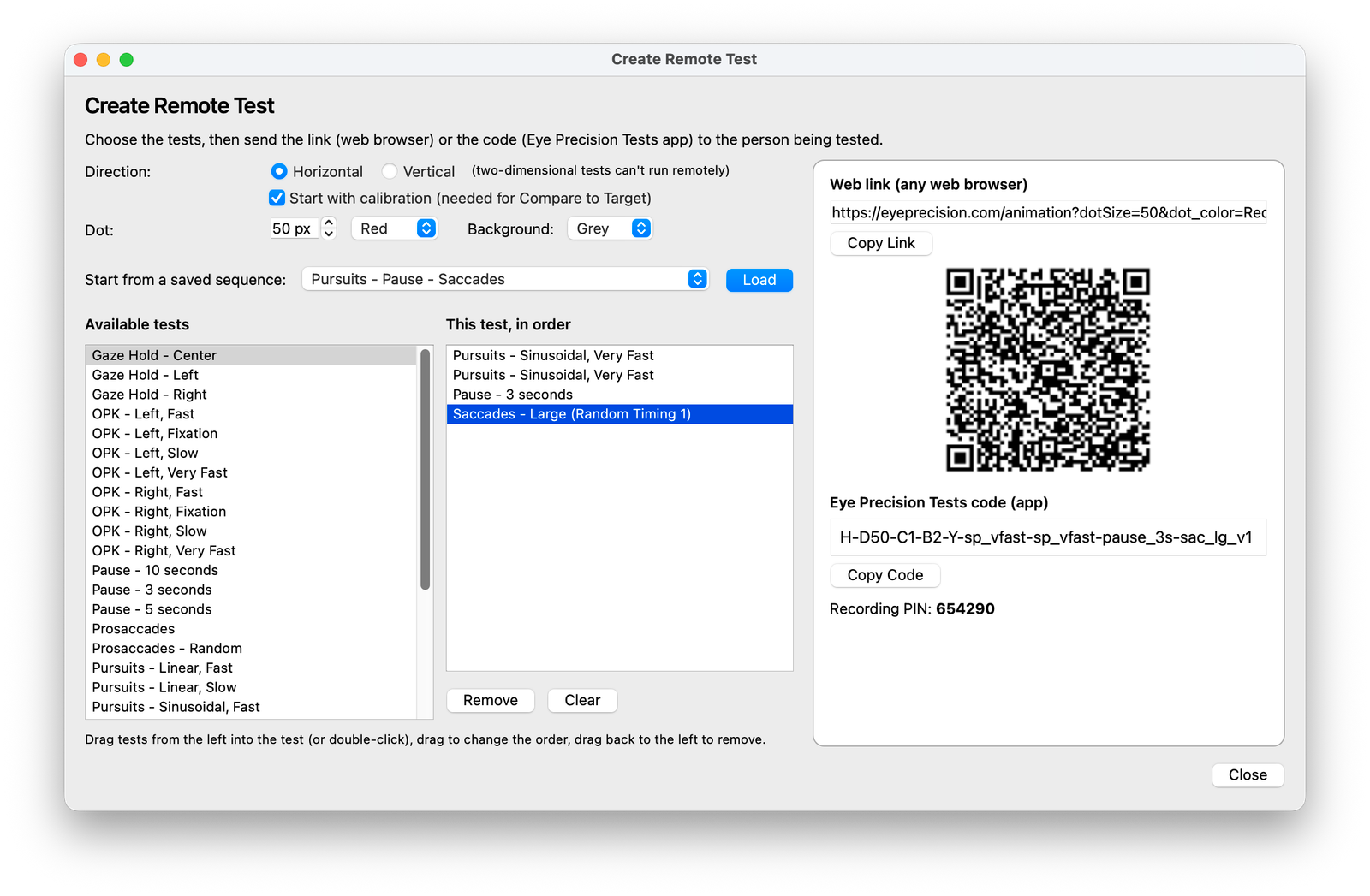
Choose the settings
- Direction – Horizontal or Vertical. Two-dimensional tests can't run remotely
- Start with calibration – needed if you want to use Compare to Target with the recording
- Dot and Background – size and colours of the target. These start with the same values as in Run Test
Choose the tests
Drag tests from Available tests on the left into This test, in order on the right (or double-click them). Drag within the list to change the order, and drag a test back to the left to remove it. Remove and Clear under the list work too
Only tests that can run remotely are listed
To reuse a sequence saved in Run Test, choose it under Start from a saved sequence and click Load
The link and the code
As soon as the test has at least one test (or calibration), the right side of the window shows:
- the Web link for any web browser, with Copy Link
- a QR code that opens the same link on a phone or tablet
- the Eye Precision Tests code for the app, with Copy Code
- the Recording PIN, which identifies the recording on the Eye Precision website
The link and code update as you change the test. See Sharing the test
You can also create a link from Run Test: set up the queue there and click Generate Shareable Link