Installing on Windows
1. Download the Windows installer (.msi) from eyeprecision.com/downloads
2. Open the installer: double-click the downloaded .msi file. It is usually in your Downloads folder, or click it in your browser's downloads list
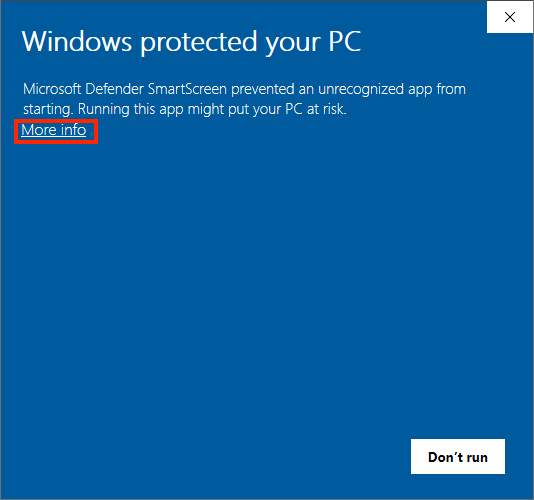
3. If Windows shows "Windows protected your PC", click More info and then Run anyway. This warning is normal for apps from small developers and appears before the installer opens
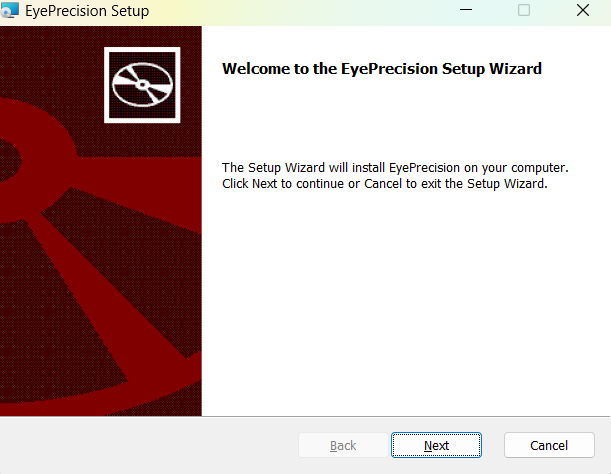
4. Follow the installer. Installation takes a couple of minutes. Windows may ask for permission to make changes; click Yes
5. Open Eye Precision from the Start Menu: it is listed as EyePrecision, or type the name in the search box. To keep it handy, right-click it and choose Pin to taskbar

6. Enter your license key from the email you received after your purchase. If you can't find it, contact support@eyeprecision.com
7. The Setup Assistant starts and asks how you record and where to save files. See the First Use Guide
To update later, download and install the new version in the same way; your license and settings are kept. See Updating the App